
Arrow Craze Out
Hong Kong Yuchi Technology Co., LimitedCasual
4.8944.00 Reviews
- Version
- 1.0.7
- Installs
- 100.00K
- Age Rating
- Everyone
Screenshots

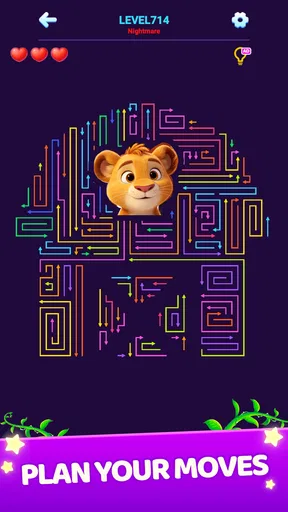
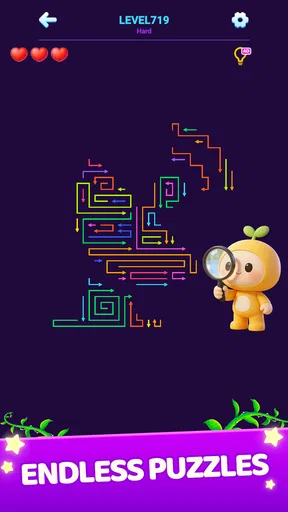

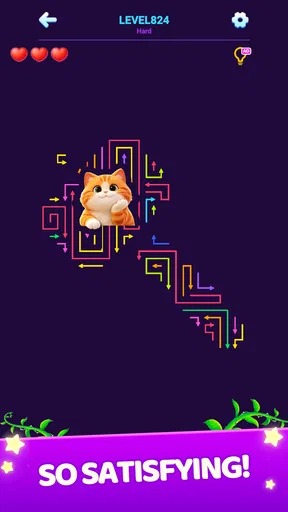
Our Review of Arrow Craze Out
 Analysis by Appyee
I picked up Arrow Craze Out expecting a quick casual distraction, and that is exactly where it makes the most sense. It is a small, brain-focused game from Hong Kong Yuchi Technology Co., Limited, built around the simple idea of making you think before you act. The store summary calls it a casual game that requires brainpower, but in practice I found the appeal comes from how easily a short session can turn into a quiet little problem-solving challenge.
It is free to play, rated for Everyone, and listed in the casual game category. That combination makes it easy to consider for a shared phone or tablet, especially when different people in a household want something they can understand without a long tutorial. It is not a social game in the sense of needing a group account or coordinated online play. Instead, it works better as a pass-the-device experience: one person tries, another watches, and both discuss the next move.
How Arrow Craze Out works in a shared household
The most useful way to approach this game is as a compact puzzle break rather than a full entertainment hub. I can imagine opening it while waiting for dinner, handing the device to someone else after a failed attempt, and comparing how each person reads the same challenge. That kind of use suits the game better than expecting a long, cinematic session or a deep multiplayer system.
On a shared device, the main advantage is the low barrier to entry. A casual game based on arrows and visual decisions can be understood quickly by a child, a parent, or someone who does not regularly play games. Nobody needs to learn a large set of controls before taking a turn. The brainwork is the point, so the interesting part begins almost immediately: look carefully, decide what should happen next, and avoid rushing into a move that creates a worse position.
I also like that this format naturally supports spectators. A person waiting for their turn can still participate by pointing out a possible route or questioning an obvious-looking move. That makes the game more suitable for a living-room setting than many solo casual titles, where watching another player offers very little. The shared-device strength is not a special family feature; it comes from the visual simplicity of the challenge and the fact that a single screen can become a conversation.
There is a trade-off, though. If several people use the same device, the game is best treated as a turn-taking activity rather than a place to maintain separate personal progress. I would not hand it around casually without agreeing who is playing and when. A puzzle attempt can be changed by the next person, and a shared screen does not automatically create clear boundaries between players. For a household that wants individual records, profiles, or carefully separated progress, a game designed around personal accounts would be a better fit.
What to decide before handing over the device
My practical advice is to establish a simple routine before anyone starts. Decide whether the device is being used for one shared challenge or for separate turns. If it is a shared challenge, talk through moves before tapping. If it is separate play, let each person finish a short attempt and then pass the device back without changing the other person’s position.
This sounds obvious, but it matters more in a puzzle game than in a button-mashing title. A single tap can alter the situation, and the person holding the device may understand the board differently from the person watching. Agreeing on the rules first prevents the familiar household argument where one player says another person “ruined” the attempt.
I found that the most enjoyable shared method is to appoint one person as the navigator and another as the decision checker. The navigator handles the screen while the checker looks for consequences. Then switch roles. This turns a basic casual game into a short exercise in communication, and it gives quieter players a way to contribute without needing to control every move.
Another useful habit is to pause verbally before committing to a move. I would ask, “What changes after this arrow?” That question encourages players to think one step beyond the obvious direction. It is especially helpful for younger users, because it makes the reasoning visible instead of reducing the game to random tapping.
Keeping play boundaries clear
Because the game is free and carries an Everyone age rating, it is easy to view it as a harmless choice for a broad household audience. I still prefer to keep the device owner in charge of installation, updates, and any store-related decisions. An age rating describes the intended content level; it does not replace an adult’s judgement about how a child uses a phone or tablet.
The game is listed as requiring Android 7.0 or later, so compatibility is straightforward for many older Android devices, but I would still check the device before planning a shared activity. A family may own a mixture of phones and tablets, and the fact that one device can run it does not guarantee that every device in the home can. This is a small practical step that avoids turning a planned game break into a frustrating setup problem.
The current version is 1.0.7. In a shared-device situation, I would keep everyone on the same installed version where possible. That is not about creating a competitive advantage; it simply makes the experience less confusing when one person sees a slightly different screen or behaves differently after an update. It also gives the device owner a clear point of responsibility instead of leaving each user to manage changes independently.
I would not create a separate account arrangement just for this game unless the device already uses one for normal store access. The game’s appeal is its immediacy, and adding unnecessary household administration would work against that. At the same time, I would avoid letting a child make installation or store decisions alone. The sensible boundary is simple: adults manage the device and downloads, while players manage the puzzle itself.
Why coordination changes the experience
Arrow-based puzzles reward attention, but shared play adds another layer: people must coordinate their thinking. When I play alone, I can follow an instinctive move and accept the result. With another person watching, I have to explain why I want to tap in a certain direction. That explanation often exposes a mistake before it happens, which is one of the game’s more interesting strengths.
For two players, I recommend dividing the task into observation and action. One player studies the available arrows and suggests a sequence. The other checks whether that sequence leaves a sensible next step, then performs the move. This avoids both people reaching for the screen at once. After a successful attempt, swap positions so the same person is not always making the final decision.
For a parent and child, I would resist solving everything immediately. The better approach is to ask guiding questions: which direction seems blocked, what could disappear or change, and what move would leave the most options? Those questions turn the game into a small thinking exercise without making it feel like homework. The child still owns the discovery, while the adult helps keep the discussion focused.
For siblings or friends, the game can become more competitive, but that is where household boundaries matter. If one player is much faster, the other may stop experimenting and simply wait for instructions. I would make the goal collaborative for some rounds: finish the challenge together, then allow individual attempts later. That preserves the puzzle’s appeal without turning every mistake into a scorekeeping dispute.
The game is also useful during short waiting periods because it does not require a large social commitment. One person can begin a challenge, another can offer a suggestion, and the device can be put away without arranging a full match. That makes it more flexible than casual games that depend on everyone being online at the same time. Its limitation is that the experience remains centered on the screen in front of you; it will not replace a game built specifically for group interaction.
Age, trust, and the right kind of supervision
The Everyone rating makes Arrow Craze Out approachable for children as well as adults, and I think the visual puzzle format is a better shared choice than many casual games that rely on pressure, loud effects, or constant competition. A child can learn by watching an adult reason through a board, while an adult can see how the child approaches uncertainty and mistakes.
Still, trust should be handled separately from content suitability. An age rating does not tell me how much screen time is appropriate, whether a child should use a personal device unsupervised, or whether the device contains other apps that need protection. I would let the game be part of a normal device routine rather than presenting it as an unrestricted activity simply because the content is suitable for Everyone.
On a family tablet, I would keep the game in a clearly agreed area of use and make sure children know whose turn it is. On a parent’s phone, I would be more cautious about accidental taps outside the game, especially when a younger player is holding the device. The best boundary is not complicated technology; it is a clear handoff and an adult nearby when the device contains personal information or important apps.
Adults should also watch for frustration. A puzzle that looks simple can become irritating when a player repeats the same mistake. I would suggest a short break instead of giving increasingly detailed instructions. The point is to exercise attention, not to force completion. If a child enjoys the visual challenge but dislikes being corrected, let them explain their plan first and only offer help after they ask.
For older users, the game may work as a light mental break, but I would keep expectations realistic. It is not a replacement for a dedicated brain-training program, a strategy game, or a structured educational tool. Its value is in the immediate decision-making loop: observe, think, act, and adjust. That is enough for casual play, but it does not need to be presented as more than that.
Where it fits among casual alternatives
Compared with match-three games, Arrow Craze Out feels less dependent on creating a relaxing rhythm of repeated combinations. A match-three title is often easier to play while distracted; this game asks me to look more carefully before committing. That makes it a stronger choice when I want a small reasoning challenge, but a weaker one when I want something almost automatic after a tiring day.
Compared with endless runners, it has a calmer pace and less emphasis on reflexes. I do not choose it when I want fast movement or a constant stream of action. I choose it when the satisfaction comes from seeing a route or sequence that was not obvious at first. Players who prefer physical skill may find the experience too deliberate, while people who enjoy visual logic may appreciate the pause between decisions.
It also differs from large puzzle adventures. Those games usually offer a stronger sense of progression, a story, or a broad collection of mechanics. Arrow Craze Out is easier to pick up because it does not ask for the same long-term commitment, but that simplicity can feel limited if I want narrative context or a substantial world to explore. The right comparison is not “better” or “worse”; it is a choice between a focused quick puzzle and a more elaborate game structure.
For a shared household, I would choose it over a highly competitive casual game when the goal is cooperation. I would choose a dedicated multiplayer title instead when everyone wants clearly separated turns, rankings, or direct competition. I would also choose a more established personal-progress game for someone who wants achievements and long-term goals rather than brief mental challenges.
Who should install it, and who should skip it
I would recommend Arrow Craze Out to someone who enjoys visual puzzles, wants a free casual game, and likes the idea of thinking before tapping. It is particularly suitable for a shared phone or tablet where people can discuss moves. The Everyone rating also makes it an easy candidate for mixed-age play, provided the device owner still manages access and usage boundaries.
I would be less likely to recommend it to a player looking for a story, character development, deep strategy, or a rich multiplayer system. It is also not my first choice for someone who wants a game that can be played entirely on autopilot. The brain-focused design is the reason to try it, and also the reason it may feel less relaxing than a purely repetitive casual title.
The game’s free price lowers the risk of trying it, and its listing shows a strong 4.8 average from around seven thousand ratings. It has also passed the hundred-thousand-install mark, which suggests that it has reached a meaningful casual audience without requiring me to treat it like a major franchise. I would view those figures as useful signs of interest, not as a guarantee that every player will enjoy the same pace or challenge.
One practical limitation is that a shared-device setup can blur ownership of progress. If several household members want a private experience, they should agree on how to use the game before starting. If that sounds inconvenient, a title with explicit profiles or separate save spaces may suit the household better. Arrow Craze Out is strongest when people accept its simple, screen-centered format instead of expecting a full family-management system.
My household verdict
After spending time with it, I see Arrow Craze Out as a good small-scale choice for households that enjoy talking through puzzles. Its arrows are not merely decoration; they create a reason to slow down, predict consequences, and compare different ways of reading the same screen. That gives the game more substance than its compact casual format might suggest.
I would install it on a shared device when the plan is to take turns, cooperate, or give a child a manageable visual challenge with an adult nearby. I would keep the rules simple, let the device owner handle updates and store decisions, and avoid pretending that an age rating alone solves every question about access. Those small boundaries make the experience smoother and protect the game’s best quality: the ability to turn a few quiet minutes into shared thinking.
My final recommendation is positive but specific. Choose it for short, thoughtful puzzle sessions rather than long-form gaming. It is free, approachable, and suitable for a broad age range, yet it still asks players to pay attention. That balance makes it worth trying for families, friends, and solo players who enjoy arrow-based visual challenges. If you need personal accounts, elaborate progression, direct multiplayer, or a story-driven adventure, look elsewhere. If you want a simple game that can pass naturally from one person to another, this is a sensible addition to a casual collection.
Verdict
Strengths of Arrow Craze Out
- Simple controls make it easy to start playing immediately.
- Short rounds are ideal for quick breaks or casual sessions.
- Bright visuals give the game a cheerful, accessible style.
- Increasing difficulty keeps later levels more engaging.
- Lightweight gameplay is suitable for older or less powerful devices.
Limitations of Arrow Craze Out
- Gameplay may feel repetitive after extended sessions.
- Limited variety can reduce long-term replay value.
- Some challenges may depend more on timing than strategy.
- Progress can feel slow if later levels become difficult.
- Ads may interrupt the experience for free players.
Similar Picks in This Category
View All
My Talking Angela
Outfit7 Limited4.2

My Talking Tom
Outfit7 Limited4.3

Pou
Zakeh4.2

My Talking Tom 2: Pet Game
Outfit7 Limited4.3

Candy Crush Saga
King4.6

Bridge Race
Supersonic Studios LTD4.1
Frequently Asked Questions
What is Arrow Craze Out and how is it played?
Arrow Craze Out is a casual puzzle game centered on clearing arrow-based challenges. You generally need to observe the direction of the arrows, plan the correct order of moves, and remove or guide them without creating obstacles. The early stages are easy to understand, but later levels require more careful thinking, timing, and attention to the layout before making a move.
Is Arrow Craze Out free to download and play?
Arrow Craze Out can generally be downloaded and played without an upfront purchase, making it accessible to casual players who want a quick puzzle experience. However, free games may include advertising, optional in-app purchases, or both. Before installing, check the store listing for the current pricing details, available purchases, and whether the game offers any paid options for extra content or progress.
Does Arrow Craze Out require an internet connection?
The basic puzzle gameplay in Arrow Craze Out may be suitable for short offline sessions, which is convenient when traveling or when mobile data is unavailable. Nevertheless, features such as advertisements, rewards, cloud saving, updates, leaderboards, or purchase verification may require an internet connection. Availability can vary by device and version, so test offline access after installation rather than assuming every feature works without connectivity.
Is Arrow Craze Out suitable for children and beginners?
Arrow Craze Out is designed around simple controls and easy-to-learn puzzle mechanics, so beginners can usually start playing without a lengthy tutorial. The colorful presentation and short levels may also appeal to younger players. Parents should still review the app-store age rating, advertising content, and in-app purchase settings, since these details can change and may not be appropriate for every child.
Are there advertisements or in-app purchases in Arrow Craze Out?
Arrow Craze Out may use advertisements to support its free-to-play model, and it can also offer optional purchases depending on the version available in your region. Ads may appear between levels or when claiming bonuses, while purchases could provide hints, extra lives, currency, or other conveniences. If you prefer uninterrupted gameplay, review the store information and your device’s purchase controls before playing.
Play our best games!


